
VPS
··2 minute readAccessing a Self Managed VPS using SSH
Obtaining your login details
You can get your VPS's root password from inside Synergy Wholesale via the overview page for your VPS service. Here are the steps:- Login to the Synergy Wholesale Management system
- Navigate to 'VPS Hosting 'on the left hand side menu
- Click Manage
- select the VPS you would like to use and then click "overview"
- The Root password is available to be copied as needed
Logging in
Using the root password and IP Address you obtained by following the steps above, you can log in to your VPS via SSH in the following ways:- For Windows users, we recommend using Putty to login. Once you have downloaded and installed Putty, you can login as per this screenshot:
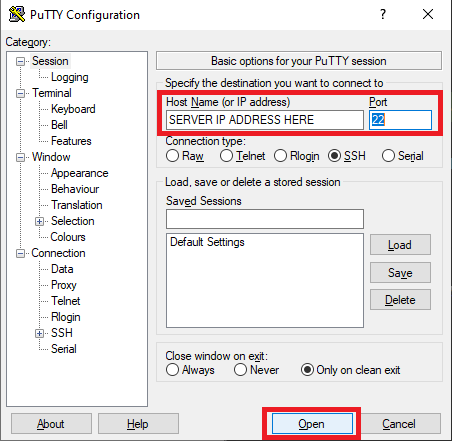 Once you click Open, you will be prompted for the login details
 - For Mac OSX users, we recommend using the inbuilt terminal to login via SSH. You can use the following shell command:
ssh root@123.456.789.000 -p 22 - For Linux users, you can use the inbuilt terminal that comes with your Linux distribution. The shell command you need is:
ssh root@123.456.789.000 -p 22 - For Redhat (e.g. CentOS based Operating Systems
yum update -y - For Debian based (e.g. Ubuntu) Operation system
sudo apt-get update