
SSL Certificates
··2 minute readReissuing a SSL Certificate
This guide will go over how to reissue an SSL certificate for an existing SSL certificate order.
Note: Reissuing the SSL certificate is not an SSL certificate renewal. A reissued SSL certificate typically carries over the remainder of the validity period of the original certificate. When performing a certificate reissue, the existing certificate would be replaced with updated certificate details (Private Key and CSR). The new certificate's expiration date will still be subject to the 200-day maximum validity period set by the industry.
- Log in to the Synergy Wholesale Management System.
- Click on 'SSL certificates' → 'Manage'.
- Search and click on the SSL certificate you would like to reissue → Click 'Reissue'.
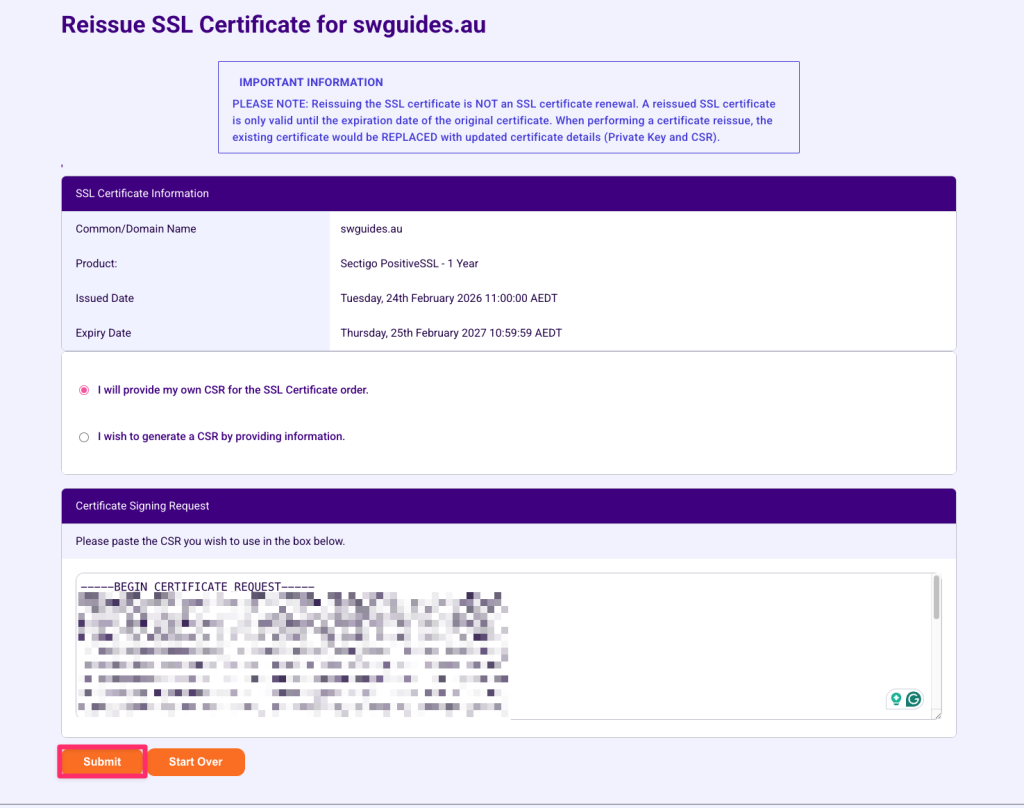
- From here, you will be prompted to select either:
- Provide your own CSR for the SSL Certificate order: Choose this if you have already generated a CSR and Private Key. You will be able to paste in your new CSR.
- Generate a new CSR: Choose this if you would like to generate a new CSR. You will be asked to fill out some information to generate the CSR. The Private Key will also be saved automatically.
- Once you have made your selection and filled out all fields, click 'Submit'.
- Upon submission, your SSL certificate will undergo the reissue process.