
Web Hosting
··1 minute readConfiguring Email Routing in cPanel
If your domain's email routing in cPanel is not set correctly, it can cause incoming emails (especially from website contact forms) to fail, bounce, or go to the wrong server.
How to resolve
- Login to cPanel
- Go to Email Routing
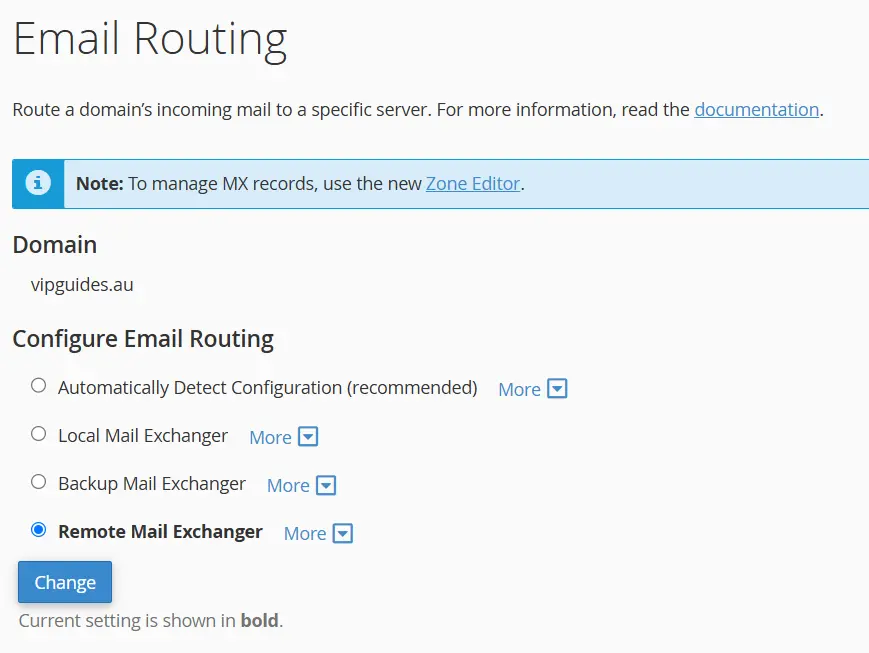
- Select your domain if applicable from the dropdown and choose the option that fits your use case:
- Local Mail Exchanger: Choose this if your email is hosted within cPanel.
- Remote Mail Exchanger: Choose this if you use an external provider (e.g. Business Email Hosting, Microsoft 365, Google Workspace).
- Click 'Change' to save
Recommendations
- If you are using cPanel email, set Email Routing in cPanel to Local.
- If you are using email hosted outside of cPanel (eg. Google Workspace, Microsoft 365), set Email Routing in cPanel to Remote.