Web Hosting
··2 minute readEnabling and using LSCache on WordPress
What is LSCache?
LSCache is simply a plugin for WordPress that makes managing the LiteSpeed Cache for your website incredibly easy. The plugin is even compatible with most if not all other WordPress plugins such as WooCommerce, Yoast SEO, Wordfence Security, Avada and Contact Form 7. If you haven't already set up the recommended caching plugin from your new server, then LSCache is our recommendation unless presided otherwise, but before continuing, it's important to note some information;- Synergy Wholesale is not responsible and cannot support utilising the LSCache plugin inside your WordPress installation. These instructions are provided as-is, and we suggest you consult your developer before undertaking any of these actions. We cannot offer extended support for third-party applications as they fall outside the scope of our team's technical support.
- It's always recommended that you take a backup before performing any of these steps - There are no known incompatibilities with the LSCache plugin, but it's always best to play it safe.
How do I enable LSCache?
Given it's just a WordPress plugin, it really could not be easier to install LSCache.- On your WordPress installation admin backend, go to Plugins >> Add New and search for LiteSpeed Cache.
- Click "Install Now" to install it and "Activate" to activate it.
How to clear the cache
Here are the steps you need to take to clear the cache that LiteSpeed is storing for your WordPress website.- Log in to your WordPress website.
- Click on LiteSpeed Cache in the menu to the right of the page, then click Toolbox.
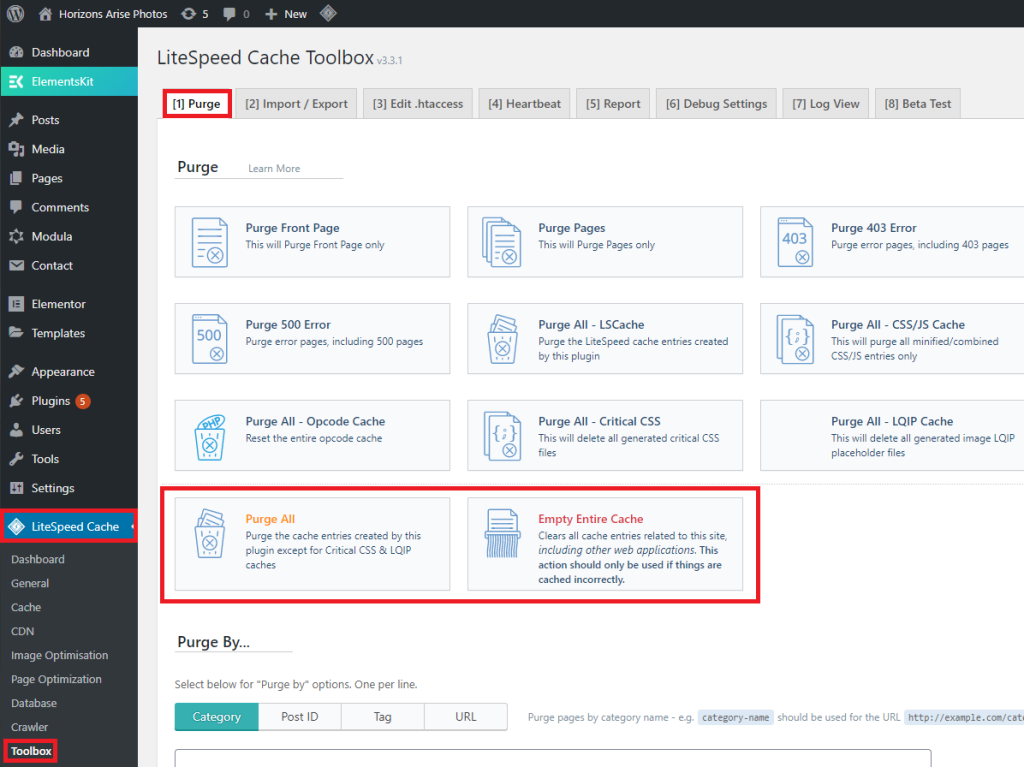
- Click Purge All to only clear data for this website, or click Empty Entire Cache or clear the cache for this website and any other website setup in the same cPanel account.