
Microsoft 365
··2 minute readSetting Up DKIM for Your Microsoft 365 Domain
This article will go over setting up DKIM signing for your emails through Microsoft 365.
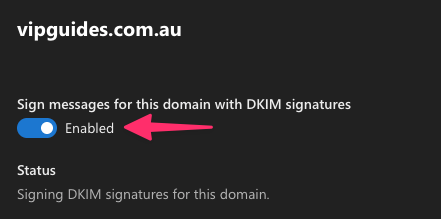 Once clicked a security dialog will open with the following text:
It may take several minutes to synchronize the status change.
After you select OK to close the dialog, the following settings are shown on the domain details flyout if the CNAME records are detected successfully:
Once clicked a security dialog will open with the following text:
It may take several minutes to synchronize the status change.
After you select OK to close the dialog, the following settings are shown on the domain details flyout if the CNAME records are detected successfully:
Sign into the Defender portal and Enable DKIM
- Sign into the Defender portal as a user with Global administrator and search for "Email authentication settings" or click here to navigate there directly.
- Click on the toggle next to your domain to enable DKIM.
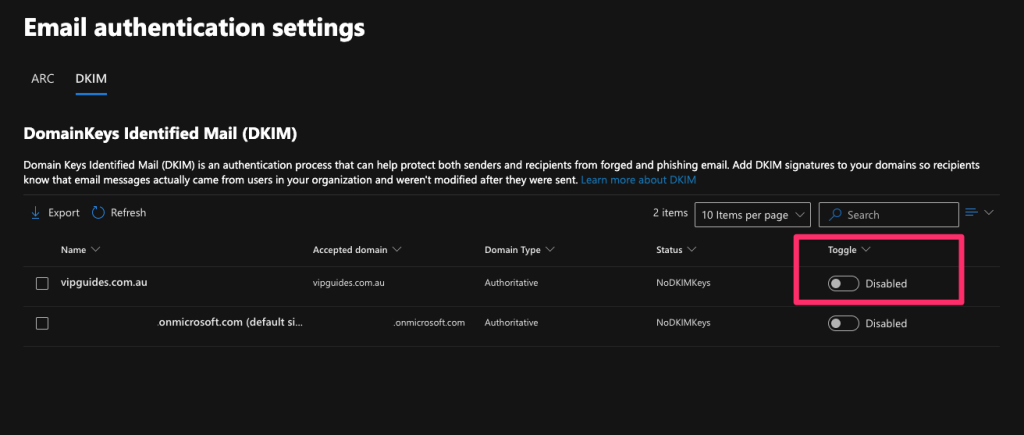
- You will get an error dialog pop up, you can close this and click anywhere in the row other than the check box next to the Name value or on the Toggle value to open the details flyout for the domain.
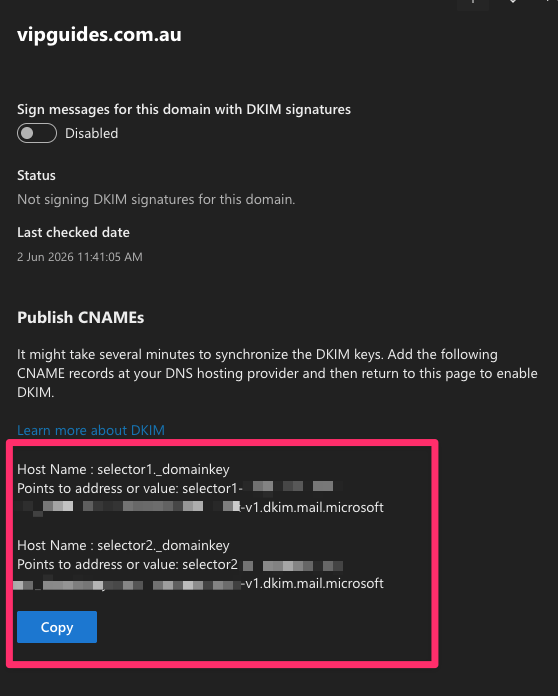
- It will ask you to add two CNAME DNS records. Leave this page open.
Add the CNAME records with your DNS hosting provider
Next we will add the two CNAME records.Domain or hosting is with Synergy Wholesale
If your domain name or hosting is with Synergy Wholesale, you can use the following guides to add in the two CNAME records in:Domain or hosting is with another provider
If your domain or DNS hosting is with another provider (e,g Cloudflare), please login to your providers DNS management page, copy the two CNAME and add the records in. If you're not comfortable adding these in, please reach out to your provider for assistance and they should be able to add them in for you. Once the two CNAME records are added, allow a couple minutes or up to 6 hours for DNS propagation. Next, go back to the Microsoft flyover page and click the toggle 'Sign messages for this domain with DKIM signatures' toggle.
Once clicked a security dialog will open with the following text:
It may take several minutes to synchronize the status change.
After you select OK to close the dialog, the following settings are shown on the domain details flyout if the CNAME records are detected successfully:
- The Sign messages for this domain with DKIM signatures toggle is enabled
- The status value is Signing DKIM signatures for this domain.
- Last checked date: The date and time should be more recent